Promotions Adjustments in Carts
In this document, you’ll learn how a promotion is applied to a cart’s line items and shipping methods using adjustment lines.
What are Adjustment Lines?#
An adjustment line indicates a change to an item or a shipping method’s amount. It’s used to apply promotions or discounts on a cart.
The LineItemAdjustment data model represents changes on a line item, and the ShippingMethodAdjustment data model represents changes on a shipping method.
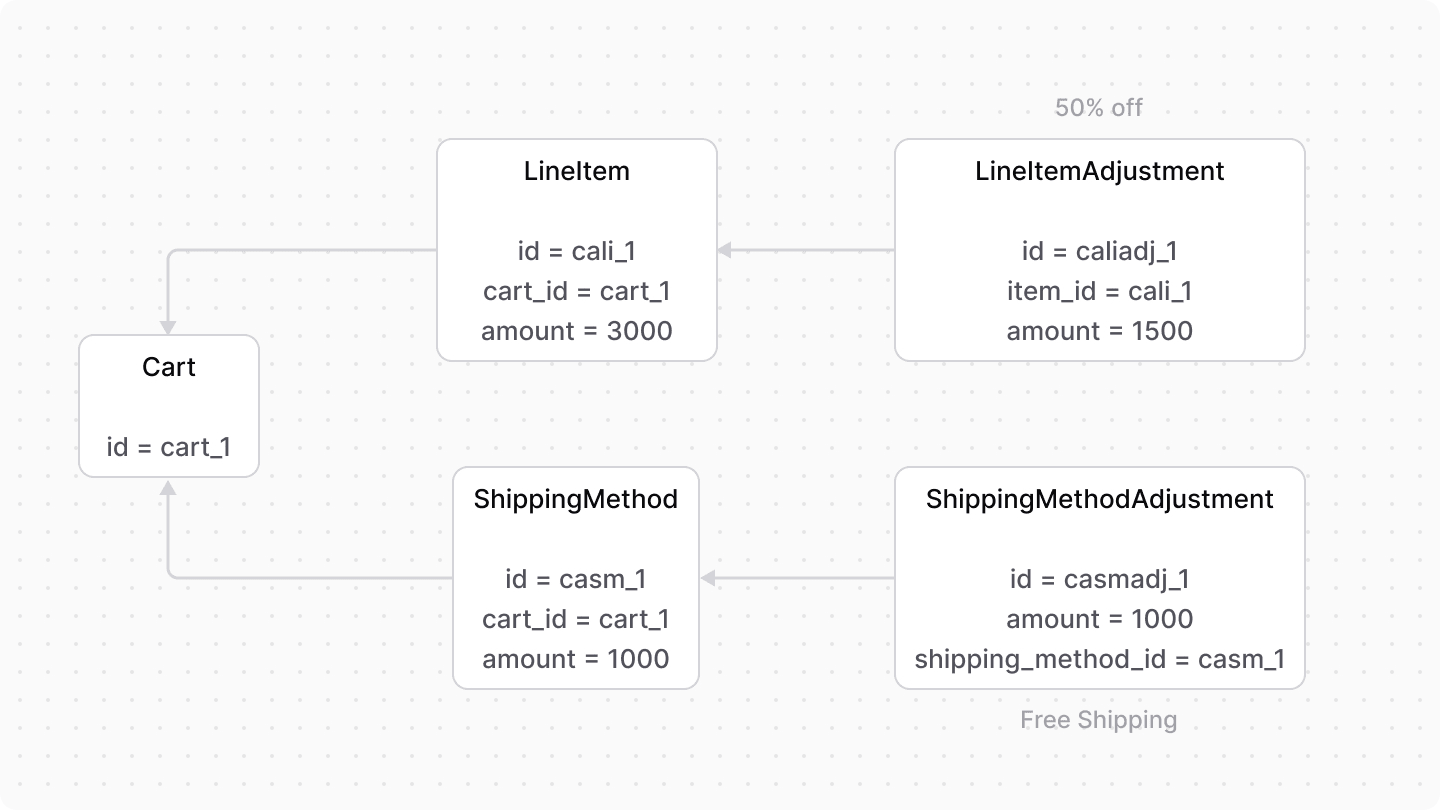
The amount property of the adjustment line indicates the amount to be discounted from the original amount. Also, the ID of the applied promotion is stored in the promotion_id property of the adjustment line.
Discountable Option#
The LineItem data model has an is_discountable property that indicates whether promotions can be applied to the line item. It’s enabled by default.
When disabled, a promotion can’t be applied to a line item. In the context of the Promotion Module, the promotion isn’t applied to the line item even if it matches its rules.
Promotion Actions#
When using the Cart and Promotion modules together, such as in the Medusa application, use the computeActions method of the Promotion Module’s main service. It retrieves the actions of line items and shipping methods.
For example:
// retrieve the cart
const cart = await cartModuleService.retrieveCart("cart_123", {
  relations: [
    "items.adjustments",
    "shipping_methods.adjustments",
  ],
})

// retrieve line item adjustments
const lineItemAdjustments: ComputeActionItemLine[] = []
cart.items.forEach((item) => {
  const filteredAdjustments = item.adjustments?.filter(
    (adjustment) => adjustment.code !== undefined
  ) as unknown as ComputeActionAdjustmentLine[]
  if (filteredAdjustments.length) {
    lineItemAdjustments.push({
      ...item,
      adjustments: filteredAdjustments,
    })
  }
})

// retrieve shipping method adjustments
const shippingMethodAdjustments: ComputeActionShippingLine[] =
  []
cart.shipping_methods.forEach((shippingMethod) => {
  const filteredAdjustments =
    shippingMethod.adjustments?.filter(
      (adjustment) => adjustment.code !== undefined
    ) as unknown as ComputeActionAdjustmentLine[]
  if (filteredAdjustments.length) {
    shippingMethodAdjustments.push({
      ...shippingMethod,
      adjustments: filteredAdjustments,
    })
  }
})

// compute actions
const actions = await promotionModuleService.computeActions(
  ["promo_123"],
  {
    items: lineItemAdjustments,
    shipping_methods: shippingMethodAdjustments,
  }
)
The computeActions method accepts the existing adjustments of line items and shipping methods to compute the actions accurately.
Then, use the returned addItemAdjustment and addShippingMethodAdjustment actions to set the cart’s line item and the shipping method’s adjustments.
// ...

await cartModuleService.setLineItemAdjustments(
  cart.id,
  actions.filter(
    (action) => action.action === "addItemAdjustment"
  ) as AddItemAdjustmentAction[]
)

await cartModuleService.setShippingMethodAdjustments(
  cart.id,
  actions.filter(
    (action) =>
      action.action === "addShippingMethodAdjustment"
  ) as AddShippingMethodAdjustment[]
)
How Medusa Refreshes Adjustments#
In the Medusa application, the updateCartPromotionsWorkflow computes a cart's adjustments whenever the cart's promotions change or the cart is refreshed, such as after adding a line item.
A shipping method's price can depend on the cart's discounted item total, and a shipping method's adjustments depend on its price. So, after computing the adjustments, the workflow re-prices the cart's shipping methods. If any shipping method's price changes or a shipping method becomes invalid and is removed, the workflow recomputes the adjustments once more so they reflect the new shipping prices.
Recompute Adjustments in Custom Workflows#
If you make changes to a cart that affect its adjustments in your customizations, use the refreshCartPromotionAdjustmentsWorkflow to recompute them. The workflow computes the adjustments of the cart's line items and shipping methods from the cart's current state, and replaces the existing adjustments with them.
For example:
import {
  refreshCartPromotionAdjustmentsWorkflow,
} from "@medusajs/medusa/core-flows"

// ...

const { result } = await refreshCartPromotionAdjustmentsWorkflow(
  container
).run({
  input: {
    cart_id: "cart_123",
    promo_codes: ["10OFF"],
  },
})

// promotion codes that couldn't be applied
console.log(result.skipped_promo_codes)
The workflow accepts the following input:
cart_id: The ID of the cart.promo_codes: The promotion codes to apply to the cart. They replace the cart's existing promotions.cart: (optional) The cart's details, if you've already retrieved them. Otherwise, the workflow retrieves the cart by its ID.additional_promotion_context: (optional) Custom context to merge into the cart's context when evaluating promotion rules.
The workflow returns an object with a skipped_promo_codes property, which holds the promotion codes that Medusa didn't apply to the cart.